
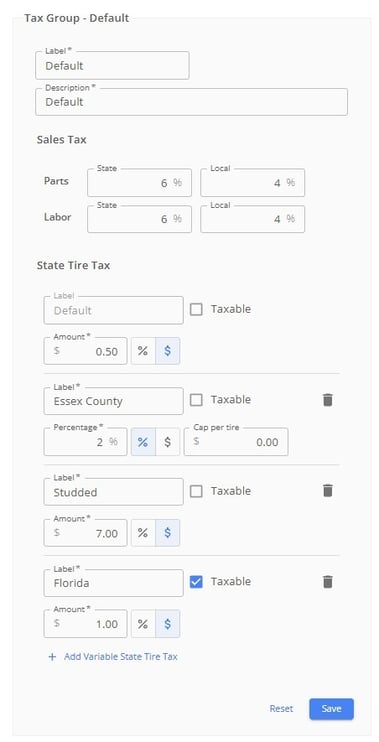
1. Open Tax Settings. From the left-hand menu, go to Shop Settings, then find the tax settings section.
2. Choose your tax type. Toggle between a flat dollar amount or a percentage. Select which you need and fill in the information.
3. Enter your tax percentage. For Arizona, for example, this would be 2%.
4. Enter the per-tire cap. In the cap field, enter the maximum dollar amount to charge per tire. For Arizona, this would be $4.66. (Leave the cap field empty if you do not want a cap.)
5. Save your settings. Tire Tutor will now apply the lower of the two values — either the calculated percentage or the cap — to every tire on a work order.
How it works on a work order: The tax is applied per tire and multiplied by the tire quantity. If the tire's percentage-based tax would exceed the cap, the cap is used instead. If it's under the cap, the percentage is used.
To override on an individual work order: Open the work order, click into the tire tax dropdown, and adjust the dollar amount or percentage as needed, then save. This will recalculate the tax for that order only.