
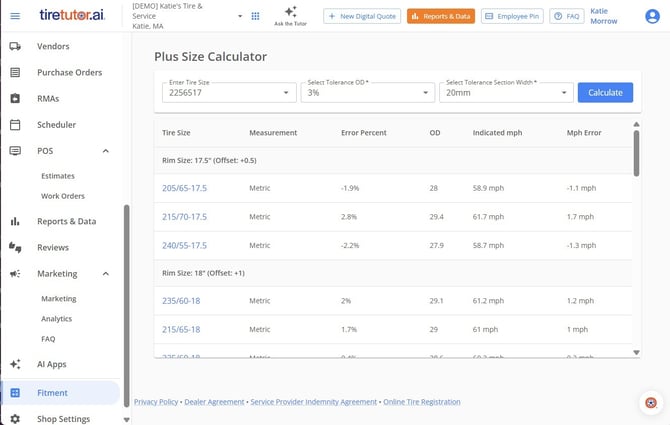
Use this when a customer wants to change their rim size (for example, upgrading to larger rims, adding chunkier off-road tires, or fitting skinnier winter tires) and you need to confirm the new wheel-and-tire combination will fit their vehicle safely.
1. Open the Fitment tool. From the left-hand menu, go to Shop Settings, then select Fitment. (You can also access Shop Settings from the icon at the top of the screen.)
2. Enter the customer's current tire size. This is your starting point — the tool uses it to calculate compatible alternatives.
3. Set your tolerance percentage. This controls how much variation in overall diameter you'll allow, based on the space available in the vehicle's wheel well.
4. Set the width allowance. Specify how much wider than the original tire you're willing to go.
5. Click Calculate. The tool will return a list of compatible rim-and-tire combinations, including speed ratings for each option.
6. Select the combination the customer wants. The selected option will carry over into the catalog so you can add it directly to a work order or purchase.
Why this matters: If you skip this step and fit a tire whose overall diameter is off-spec, you can throw off the vehicle's speedometer, odometer, ABS, and traction control. A tire that scrapes the fender well will also cause premature wear. In some states, a significantly off-spec odometer reading is a legal issue at resale.